
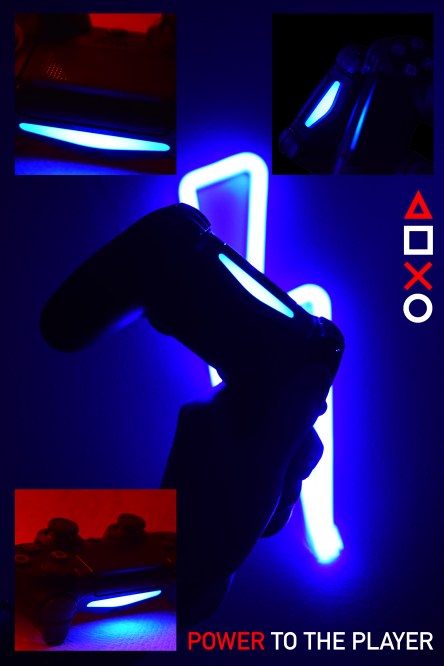
I decided to create an advertisement for a Playstation controller. Even though this isn’t necessarily portrait photography, I’m working on my lighting and composition skills. Working with a nonorganic model has its benefits, and they’re always good practice. Inorganic models, of course, cannot move, which means that I can take photos with a lower iso. Especially in low light, it makes things a lot easier.
For the pictures of the controller, I lit it using some of the strip led lights in my room. With a person, the photos would have come out a lot more blurry/ grainy. However, by the end of this semester, I want to experiment with portrait photography with similar lighting.
I was inspired by looking at modern-day advertisements. I’ve noticed that a lot of them utilize complementary colors, which I did with the red and the blue, and have minimal usage of text.
The shapes on the side of the advertisements are the same shapes on the PlayStation controllers, and have been used in many Playstation ads.
I took the photos in my room using the lights under my desk, and a secondary light to the side of the controller. I wanted to use the red secondary light to give it some depth and visual interest. For the one photo without red in it, I turned off the lights in my room and held the controller up to the mirror.
I then edited all of the pictures separately in Photoshop. I mostly just edited the hues, saturation, and levels. However, with the image of the controller in the mirror, I did some more editing on that in particular. I masked the controller from the mirror in the background with the smart object selection tool, selected the inverse of the image, deleted the background which made a png, and filled it with the bucket tool.
I then cropped the images into a square except for the background image, and put them all into one image. I then lined them up with each other, resized them so they were all the same size, and positioned them so each side of the image has equal weight.
I then added text and created the shapes for the right side of the image. The triangle was more difficult to make, but not by much. With the other images, you can just click on the shapes dropdown menu, and select the shape. There is no preset for creating triangles, so I just used the polygon, and defined the shape as a polygon with three sides.
All of the images in this project were created and edited by Joseph Gardner during September 2019.
 Joseph Gardner
I loved the image you created because it really gave off that aura of a real one. I think your big forte with your image is how creative you got with your colors. You really played with the picture’s tones and the lights and you really made the colors catch your eye. The pictures you used were also yours, so I really liked that, and you really used this assignment to really get something out of it and create something relating to your career choice which happens to be photography. You can improve in summarizing your creation process a little more just to make it facile for the reader. Lastly, another thing you can improve on is sort of diminishing the images onto the background so everything in your image can be more cohesive and those rough edges of your smaller pictures can be less noticeable, but I loved how clean everything in your image looks.
LikeLike
I think that I could do several things better about this project. I don’t like how the photos are organized on the page. I think that if I moved the image from the upper right-hand side of the image to the middle on the left side, it would look more organized and balanced.
I also think that I could brighten up the images a bit. It all seems a little bit underexposed. I might also reshoot at least one of the pictures, because they all focus on the lights at the front of the controller, not the actual controller. It might be a good idea to focus on the buttons for one of the pictures.
I might also resize the shapes. They seem a little bit big as they are, and they’re taking away from the focus of the text. I might make it so the text goes on the right side, from top to bottom. I could then make the letters bigger, and the focus would be less on the shapes. I also might make it so the shapes are all white, not red and white.
(At the time of posting this, there are no other comments to base this off of, but I will reply to them as they come in)
LikeLike
I think you have a great idea going on for this project. I think its good that you’re interested in getting to know photography and learning more about it as you go. It’s a good idea to compare and contrast to the advertisements that are already done for PlayStation and get inspiration for yourself. The neon light of the lightning bolt in the background gives the photograph a powerful feel for the consol. It would be interesting to see if you could dim the corners of the background and have almost a spotlight on the controller, so you don’t have the neon light lingering off the center of the photograph as much. Also, for the lighting of the surrounding pictures, it’s tough to tell what they are exactly without reading what you wrote about them, you could try editing the brightness in either photoshop or Adobe lightroom, as well if you’ve ever tried that! Otherwise, you have a great idea, and I hope everything works out for the final draft!
LikeLike
Nicely done photo ad. I really enjoy the aesthetic, the low light and neon blue and red style is very visually appealing to the eye, and you did it well. I applaud your ability to capture such a creative scene in just your bedroom, and the primary image reminds me a lot of modern advertising, which you stated was your inspiration, so nice job implementing that inspiration. There are a couple things I think could use some improvements. I personally am not a fan of how the three smaller images are kind of just added onto the main image. It looks like they were just dragged onto the photo and placed into the corners. Maybe you could blend them in more, add some light/blurring effects or even borders around them to make. Photoshop has virtually limitless features. Another recommendation would be to crop those smaller images as well as the large one to different sizes and aspect ratios, to make them all fit nicer into the image. Overall this is a pretty cool photo, I like your style and I would love to see some more Photoshop tool utilization in the final draft.
LikeLike