
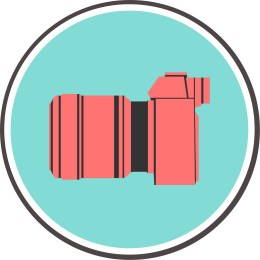
I decided to create a very simplistic camera for this project. The idea relates to my course topic “portrait photography” because it is a very literal interpretation of the subject. It is a camera, and it is how I create my art. I especially focused on the coloration, adding vibrant but contrasting colors to draw the viewer’s eye to the image, and focus on the camera in the center.
I used minimalism as a design influence. I was inspired by the circular design of a lot of modern logos, such as the Starbucks logo or the logo for Google. They’re both simplistic, use circles and have very few colors. They’re also flat, with no graduation. I researched some modern day logos, and noticed that a lot of them are circular, such as the logos mentioned.
I want to convey to the viewer that my photography is modern and artistic. I wanted to use a very simple and easily digestible design to show that I am in touch with modern graphic design themes. A lot of my design utilizes simple colors, with a lot of contrast. I wanted to show this through the use of color in my design.
When I went into the project, I didn’t know what I was going to create. I knew that I wanted to convey the fact that it is a photography business, and the easiest way to convey that would be to create camera. I purposely did not include any sort of text so that the reader would focus on the camera. I then took a picture of a camera, downloaded it from Google, and traced the basic shapes of the camera with the pen tool. I then did this a second time, but I just did it with the outlines of the camera. I then put it behind the red blocks to bring the design together and make it into a more coherent shape. I then created two circles, and put them inside of each other. I put that in the background of the camera object.
I created all of the elements used to create the project. I used the shape tool to create the circles, then I edited the shapes line weight to create variation and make it more pleasing to look at, and changed the color of the circles. I used the pen tool for the entire camera.
I encountered difficulty with centering everything on the page. The ruler tool helps a lot, and so does the align by tool with the boxes. Using that, I was able to position things a lot easier than it is in Photoshop. I really strongly suggest that students should use similar techniques in positioning things that are supposed to line up or are symmetrical.
I used an image of a Sony a711 for a reference image found at https://www.richmondcamera.com/sony/sony-a7ii-w-28-70-full-frame-mirrorless-camera
 Joseph Gardner
think that I could really work on the coloration of this image. I like how it looks as is, but I have gotten some feedback from family and friends that it is kind of hard to see initially that the logo is a camera. I also might benefit from adding text to the image to make it clearer what the brand is. Even though it is a camera, you can’t tell that it is for portrait photography. I might add some text that says that it is, to clear things up. With the color change, I might just reverse the colors from the inside of the camera to the out, making it primarily grey and with red accents.
I also might change the camera to point to the right side. It just looks kind of weird pointing to the left, because most logos point to the right to signify progress and drive.
LikeLike
Honestly I do not know how to critique this. You hit all the points that you said you wanted to hit. It is minimalistic but you can clearly tell what the logo in the middle is supposed to be. The camera build looks really good and I would not change anything about that at all. This logo definitely gives off a photography vibe, so great job.
One thing you might consider would be adding some text to the body of the logo. I do not know if you have any text to put there currently but I think it would benefit from having something there. If you do add text though make sure you choose a font that compliments the rest of the design that you have going on.
Another suggestion I have isn’t so much a suggestion but just something to think about. The colors you chose do compliment each other but i’, not sure if they scream photography. Maybe choose some slightly more muted colors that make the viewer feel a little more at home with the logo. In logo creation often times overly bright colors can be a turn off for viewers. If you muted the colors a little bit I think the logo would be easier on the eyes.
All in all it is a very good logo!
LikeLike