
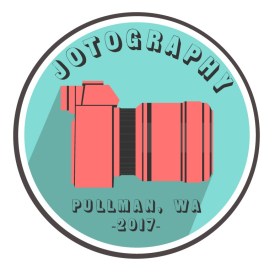
I decided to create a very simplistic camera for this project. The idea relates to my course topic “portrait photography” because it is a very literal interpretation of the subject. It is a camera, and it is how I create my art. I especially focused on the coloration, adding vibrant but contrasting colors to draw the viewer’s eye to the image, and focus on the camera in the center.
I used minimalism as a design influence. I was inspired by the circular design of a lot of modern logos, such as the Starbucks logo or the logo for Google. They’re both simplistic, use circles and have very few colors. They’re also flat, with no graduation. I researched some modern-day logos, and noticed that a lot of them are circular, such as the logos mentioned.
For my first draft, I wanted to convey to the viewer that my photography is modern and artistic. I wanted to use a very simple and easily digestible design to show that I am in touch with modern graphic design themes. A lot of my design utilizes simple colors, with a lot of contrast. I wanted to show this through the use of color in my design.
When I went into the project, I didn’t know what I was going to create. I knew that I wanted to convey the fact that it is a photography business, and the easiest way to convey that would be to create a camera. I purposely did not include any sort of text so that the reader would focus on the camera. I then took a picture of a camera, downloaded it from Google, and traced the basic shapes of the camera with the pen tool. I then did this a second time, but I just did it with the outlines of the camera. I then put it behind the red blocks to bring the design together and make it into a more coherent shape. I then created two circles and put them inside of each other. I put that in the background of the camera object.
I received one piece of feedback, and it said that I should consider adding some text to the body of the logo. I agreed, so I did just that. I used the same technique as the tutorials showed in the cougar logo to create a circular wrapped text.
I also considered the feedback of changing the colors, experimented with it, and decided to keep them the same as they were before. I like the fact that it draws attention to the camera, so I didn’t change it. It is bright, but it makes the reader notice it.
I also flipped the camera in my revision. It makes the logo look more progressive, because it’s facing forward.
The last thing that I did was to create a shadow on the camera. This just adds a bit more depth to the image. I also added some detail to the body of the camera to create more texture and depth.
I created all of the elements used to create the project. I used the shape tool to create the circles, then I edited the shapes line weight to create variation and make it more pleasing to look at, and changed the color of the circles. I used the pen tool for the entire camera.
I encountered difficulty with centering everything on the page. The ruler tool helps a lot, and so does the align by tool with the boxes. Using that, I was able to position things a lot easier than it is in Photoshop. I really strongly suggest that students should use similar techniques in positioning things that are supposed to line up or are symmetrical.
I used an image of a Sony a711 for a reference image found at https://www.richmondcamera.com/sony/sony-a7ii-w-28-70-full-frame-mirrorless-camera
 Joseph Gardner
Leave a comment